


Published on: 20 January 2026
Last updated on: 20 January 2026
Sophia® error code 1800: Overlapping contours
If you see code 1800 in Sophia®, it means that your drawing contains overlapping cutting contours that we cannot create. We see this in the following situations:
- Overlap in the unfolding
- No space between flanges and/or flat parts
In this blog, we explain each situation, provide examples, and tell you what you can do to solve it.
Situation 1: Overlap in the unfolding
When you draw a folded part with your software and upload it to Sophia®, we unfold it into a so-called sheet metal pattern. We laser cut the base from a flat sheet and then bend it into the desired shape.
However, sheet metal parts are often drawn in 3D, which cannot be fully unfolded because multiple contours (or flanges) overlap in the flat pattern.
Solution: Click on the error message in Sophia®, check which contours are involved, and adjust your 3D drawing accordingly.
Below are two examples that illustrate this situation.
Example 1: internal bend
The first example is fairly straightforward: a folded part with an internal bend. See the illustration below.
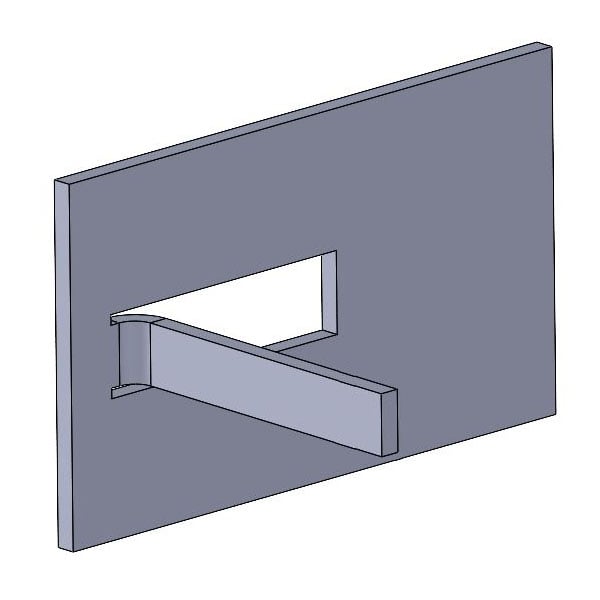
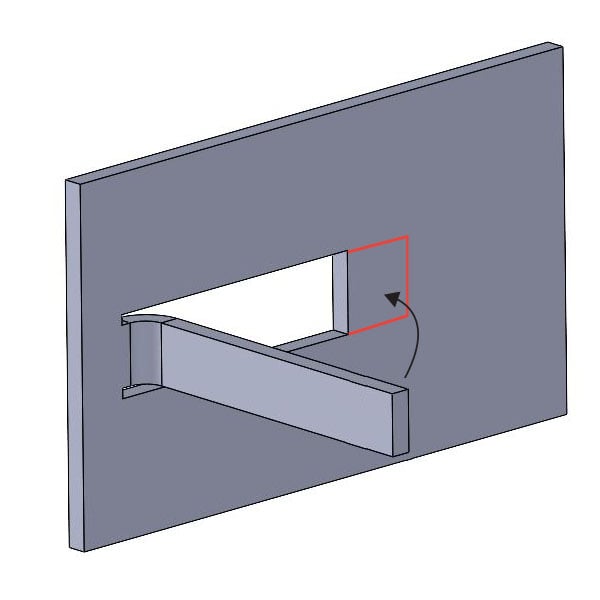
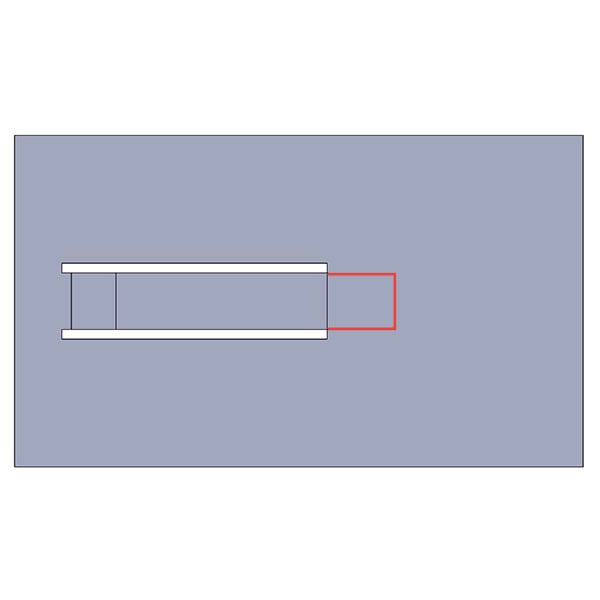
You can see that the length of the flange is drawn longer than the hole from which it is to be cut. Would we unfold this edge part? Then we would see after just one fold that a problem arises.
There is an overlap between the flange and the uncut part. This means that we cannot laser cut this part from a single sheet. This is only possible if the flange is drawn shorter or the hole longer. In any case, the hole must always be larger than the flange that is cut from it.
Example 2: overlapping flanges
The second example is slightly more difficult to recognize, but it is the one we encounter most often in practice. It concerns parts where two flanges overlap each other. See the part below.
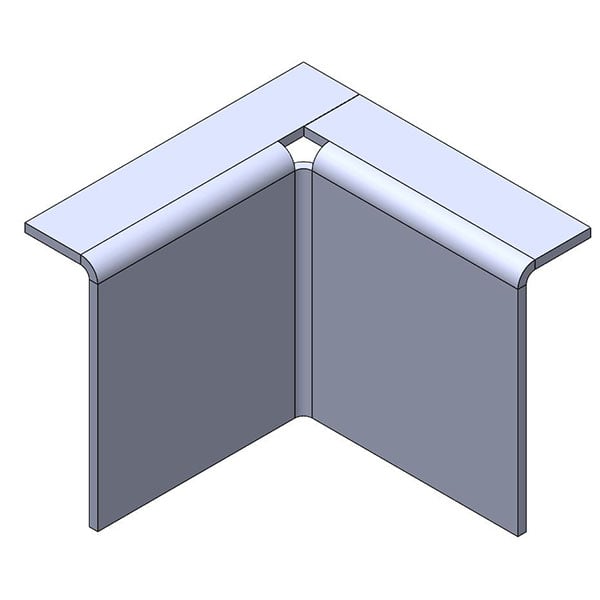
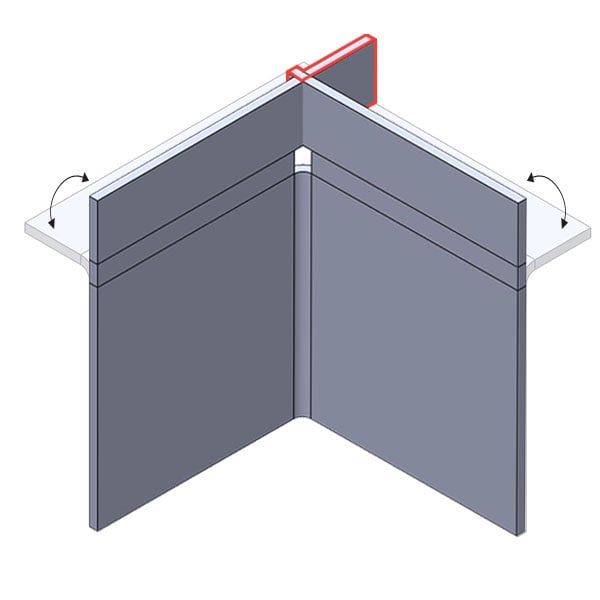
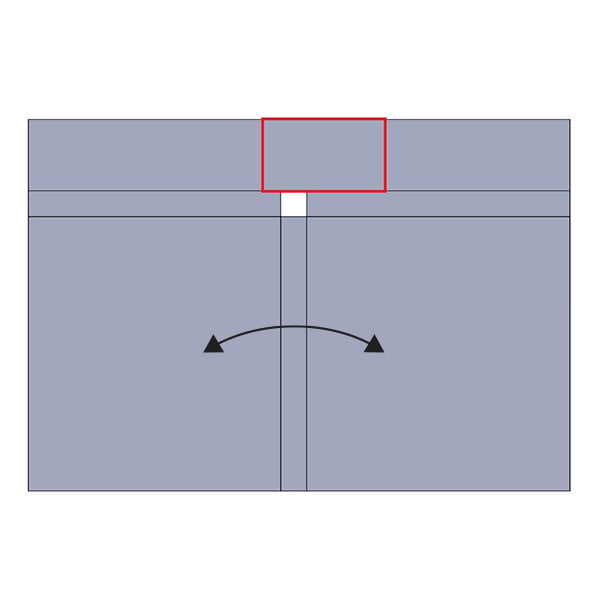
The problem with this design lies in the square corners of the edges. These overlap each other in the unfolded design. You can see this happening above when we unfold the part. This means that we cannot cut this part out as a single piece either.
Situation 2: No distance between flanges and/or flat parts
Ideally, our lasers cut a contour in a continuous motion, without stops or pauses. We also want to avoid them touching each edge more than once. This minimizes the risk of burr formation and reduces unevenness caused by frequent cutting.
To ensure that the above is possible, there must always be sufficient space between adjacent flanges and/or flat parts. You must therefore draw a cutting line and/or notch (also known as bend relief) between them that is wide enough. This is the only way the laser can move back and forth without touching an edge twice.
The illustrations below clarify this.
Below you can see how the laser ideally cuts a line:
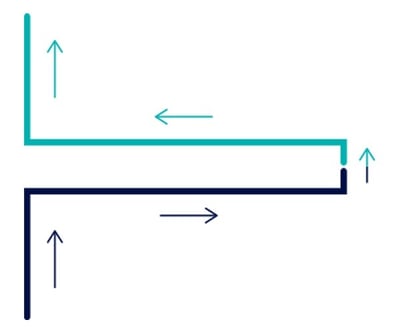
The laser cuts inwards (black), makes a sideways movement, and goes back outwards (green). This allows the laser to cut through in one continuous movement without touching an edge more than once.
But what if you draw a single line in your design, without any space in between? Then this happens:
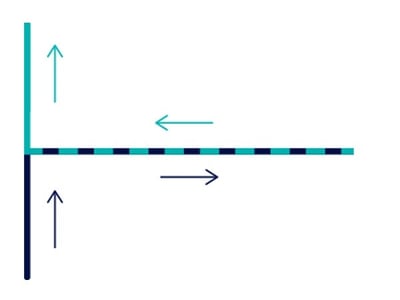
The laser cuts inward (black), makes no sideways movement, and goes back outward (green) along the same line. The contours overlap each other. As a result, the laser would touch both edges twice, which is not desirable.
Solution: Click on the error message in Sophia®, check which contours are affected, and widen the cutting lines.
The minimum width of a cutting line between flanges and/or flat parts varies depending on the material and sheet thickness. You will find the exact dimensions in our delivery specifications. In general, the following rule of thumb applies: sheet thickness x 0.7 mm.
Below are two examples that often go wrong.
Example 1: cutting lines for internal bend
The first example is an internal bend. There are three cutting lines around the flange. We often see that there is no space between the flange and the flat part.
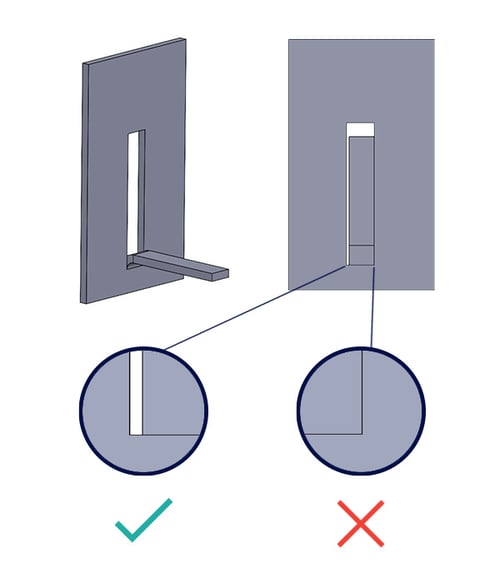
We cannot process the example on the right because there is no space. We can process the example on the left because the space between the flange and the flat part is at least as wide as the plate thickness x 0.7 mm (or in accordance with our delivery specifications).
In addition, a wide slot not only produces a neat cutting edge, but also ensures that the internal bend can be made properly.
Example 2: cutting lines for an external bend
The following example shows an external bend. Here, the designer has decided that a notch must be cut on both sides of the setting in order to create the bend properly.
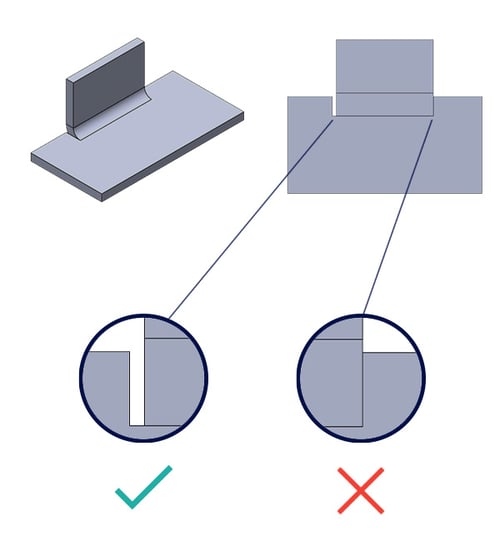
We cannot use the example on the right because there is not enough space. We can use the example on the left because the space between the flange and the flat part is at least as wide as the plate thickness x 0.7 mm (or in accordance with our delivery specifications).
In addition, a wide notch not only produces a neat cutting edge, but also ensures that the external bend can be made without deformation.
Summary
If you see error code 1800 in Sophia®, there are contours in your drawing that we cannot produce. This may be due to the following causes:
- Overlaps in the unfolding
- Insufficient space between flanges and/or flat parts
In this blog article, we have explained each cause, provided examples, and told you how to solve this.
Questions
Do you have any questions about this topic? Please feel free to contact us.
/banner_verpakkingsopties_2600x800.jpg)

/csv-import-2600x800.jpg)
/het%20verschil%20tussen%202.5D%2c%203D%20en%20XY%20Lasersnijden.jpg)